ZETEYN
The AI workbench built around research panels.
An AI engine inside your editor, reader, and research tools: it watches your field, assists your search, explains papers, and lets you accept or reject reviewer edits in one click, propagating changes across the manuscript.
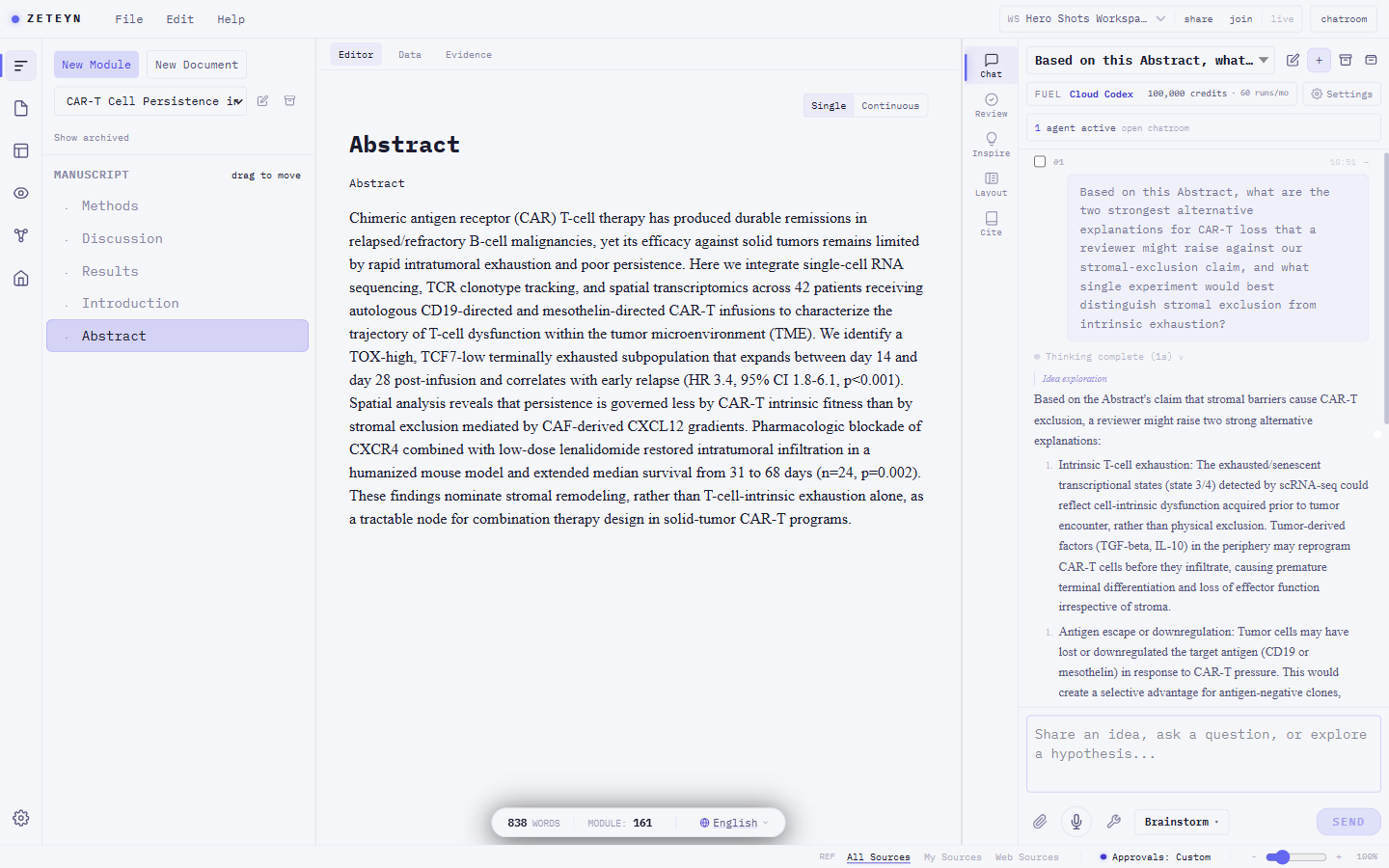
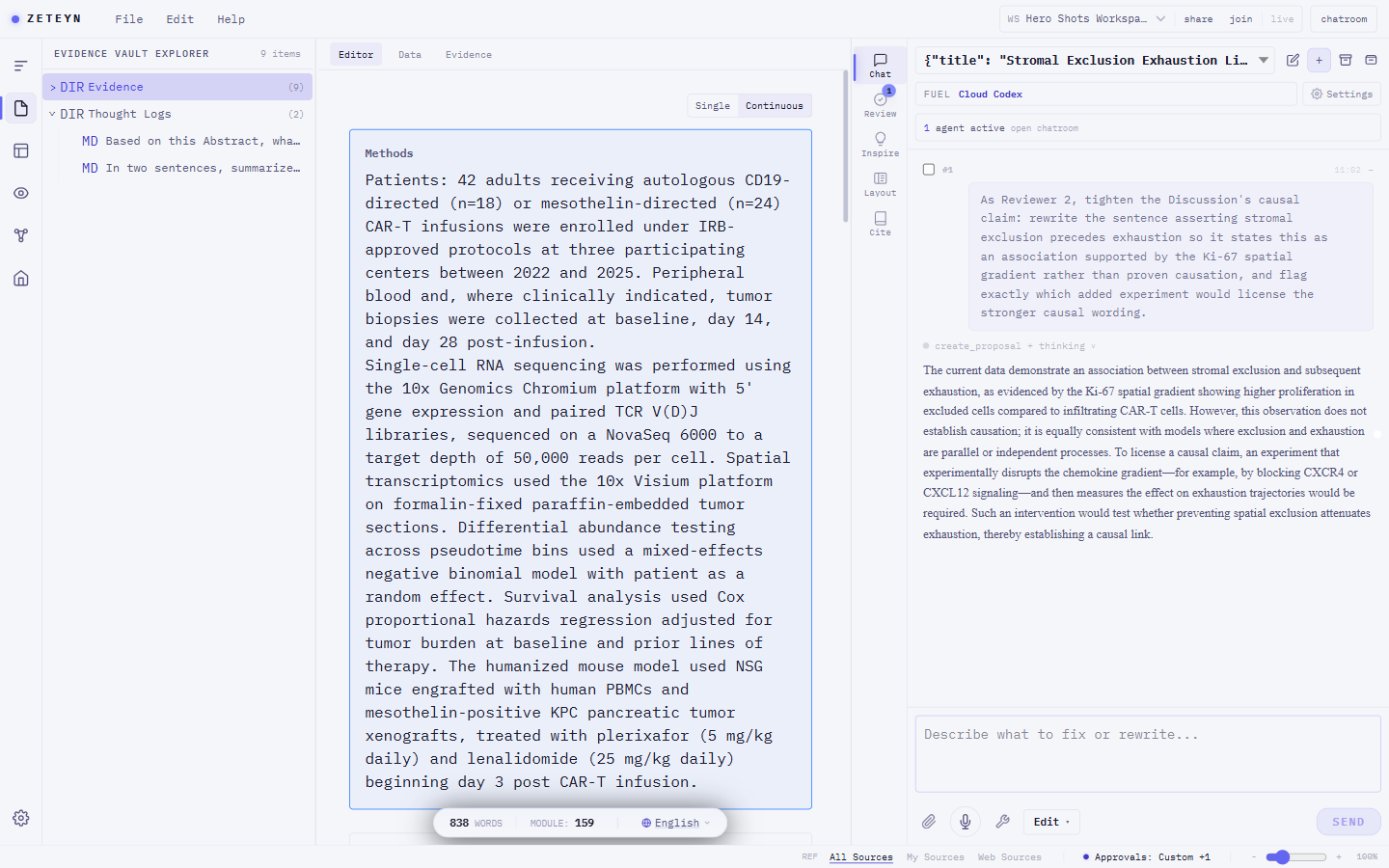
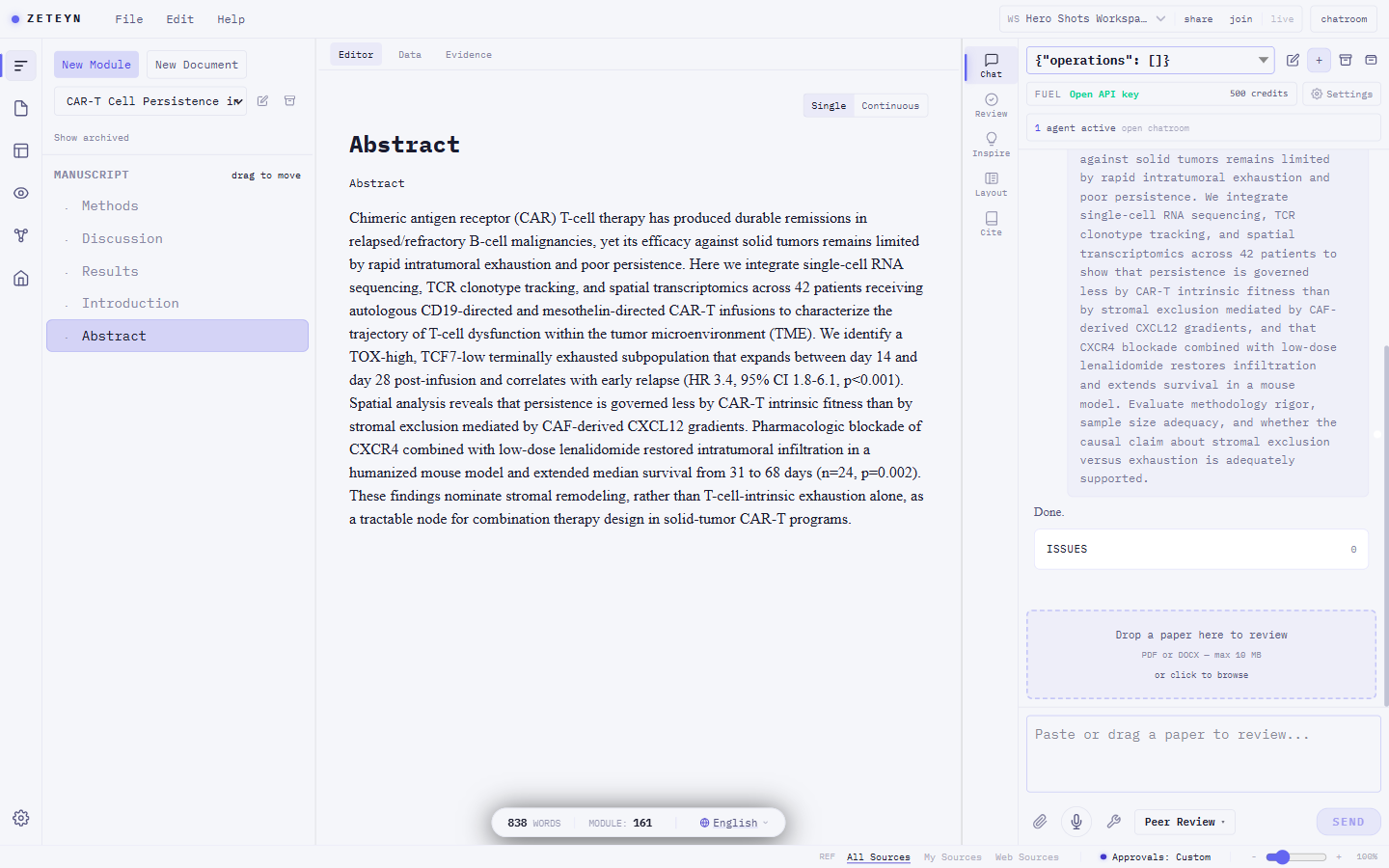
Automated research tools give you no fine-tuning panel. You run them and hope: every pass is a fresh roll of the dice, you cannot revise a single paragraph without regenerating the whole draft, and the process stays a black box you could never explain to a committee. In a codebase that trade is fine. In a dissertation you have to defend, an answer you cannot account for is worth nothing.
Zeteyn puts a full-grade agent inside your manuscript, in a glass box that keeps you in command. It edits paragraphs, runs discipline analysis, and drafts reviewer rebuttals. But nothing happens in the dark: every move is a visible change you can tune line by line, approve, audit, or roll back. You steer the small edits instead of re-rolling the whole draft, and you can always show how each change was made. That is why you can trust an agent with the work that actually matters.
The problems every researcher knows
You did not choose this work because it was easy. You chose it because it matters. These tools should not make it harder.
"I have 200 PDFs, 3 years of notes, and no idea which claim is still supported."
Every snippet you save is a hard-linked citation in a full literature library that lives on your own machine. Click any reference in your manuscript and the PDF opens to the exact sentence. Your evidence never gets lost, it gets organized.
"The AI hallucinated three citations in my introduction. I didn't notice until my supervisor did."
Zeteyn's AI operates only on your uploaded sources. It cannot fabricate citations it has not seen. Every suggested claim is traceable to a document in your vault.
"I told ChatGPT my research question. By message 15, it had no idea what my thesis was about."
Your Research Anchor (your core question, confirmed findings, and methodological constraints) is kept in the AI's view for the entire session, every session. It never forgets your project.
"I use one tool to write, another to manage citations, another to read PDFs, another to run analysis."
Writing, evidence, PDF reader, data analysis, molecule viewer, and journal formatting all live in one window, and your whole library syncs across local disk, cloud, and git. Your manuscript and your sources are always side by side.
Reviewer replies and self-critique have a home too: see Respond and Challenge in the workflow below.
An agent that does the work, not a chatbot that hands you a to-do list.
The agent works inside your manuscript
"Other AI tools hand me text to copy-paste. I am still the one doing the work."
A full-grade agent edits your paragraphs, restructures sections, and runs analysis in side panels. It does the work; you stay in command.
Every claim traced to a real source
"The AI hallucinated three citations in my introduction. I didn't catch it; my supervisor did."
Drag a passage from any PDF onto your draft and it becomes a clickable citation that reopens the source at the exact sentence. Every citation the agent adds ties back to a source in your vault, and Zeteyn checks each one against OpenAlex, Crossref, and PubMed, flagging any it needs you to confirm with a visible underline. Search arXiv, PubMed, Semantic Scholar, OpenAlex, and Crossref and import straight into the vault, with open-access PDFs resolved automatically.
It builds your analysis, not just your prose
"I want an agent that actually runs things, not one that writes me instructions to run myself."
On Plus and Pro, a hosted agent runs in a secure sandbox: it builds analysis scripts, processes your data, and generates figures and tables, then reports back each step it took. Pull a git repository in, edit in the vault, and commit straight back. Runs are metered from your credit balance, every action logged.
Every move is visible, every move reversible
"Letting an agent loose in my code is one thing. In my thesis? I need to see everything."
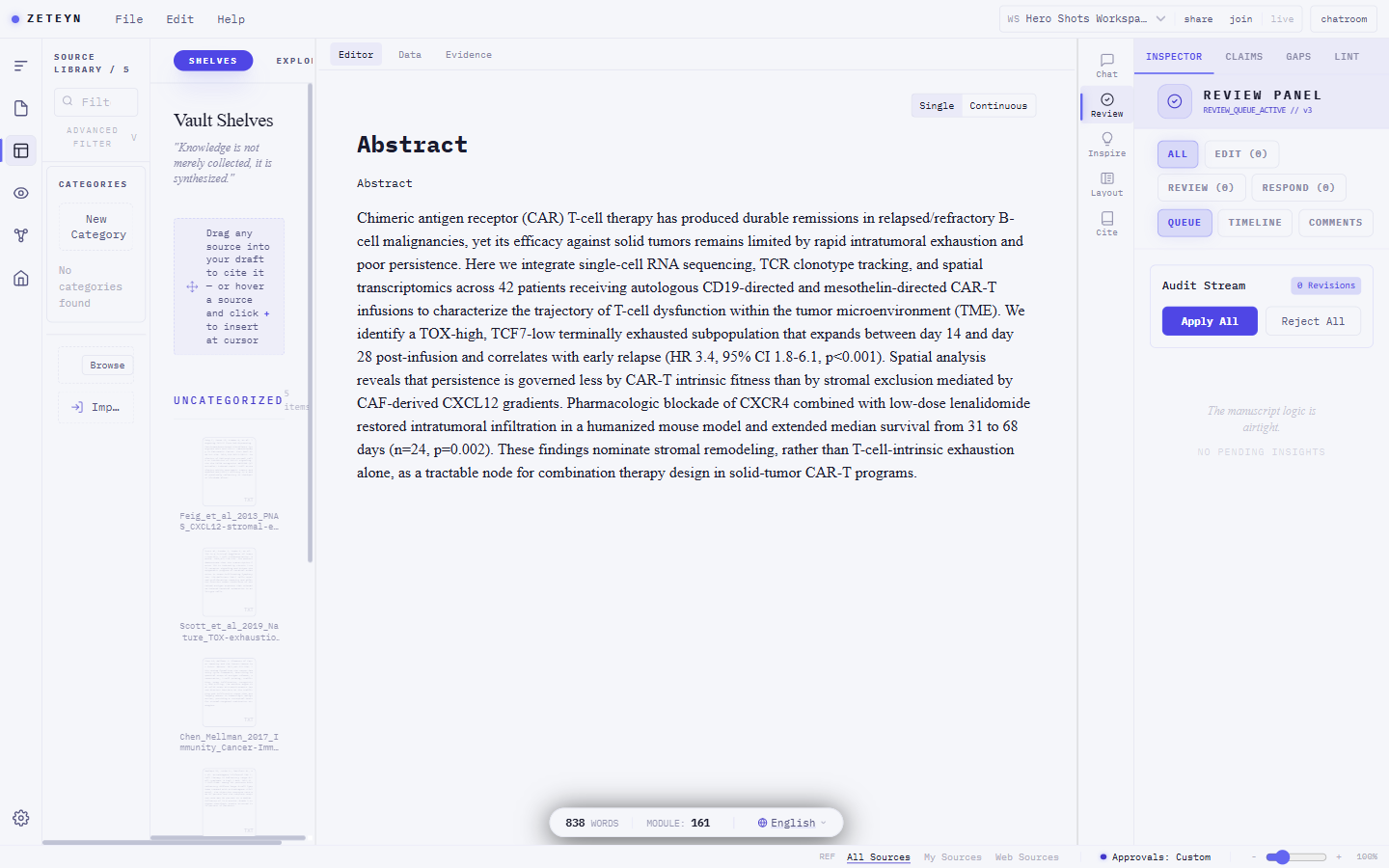
Every agent edit lands as a reviewable diff with a full audit trail. Each significant change is checkpointed, so one click rolls back both the manuscript and the conversation to a clean state.
Catch what Reviewer 2 will catch, first
"I didn't notice my discussion contradicted Chapter 2 until it was far too late."
One pass before you submit: citations verified against their sources, internal contradictions flagged, logic gaps found, journal format checked. A citation audit layer then flags over-claiming, citations whose source is real and relevant but weaker than the claim you made, and suggests a rewording the source actually supports. Work the fix-list and clear it to green. No setup required.
Field-aware workbenches, inside the document
"A generic agent does not know a Western blot from a Bayesian prior, or how to run my data."
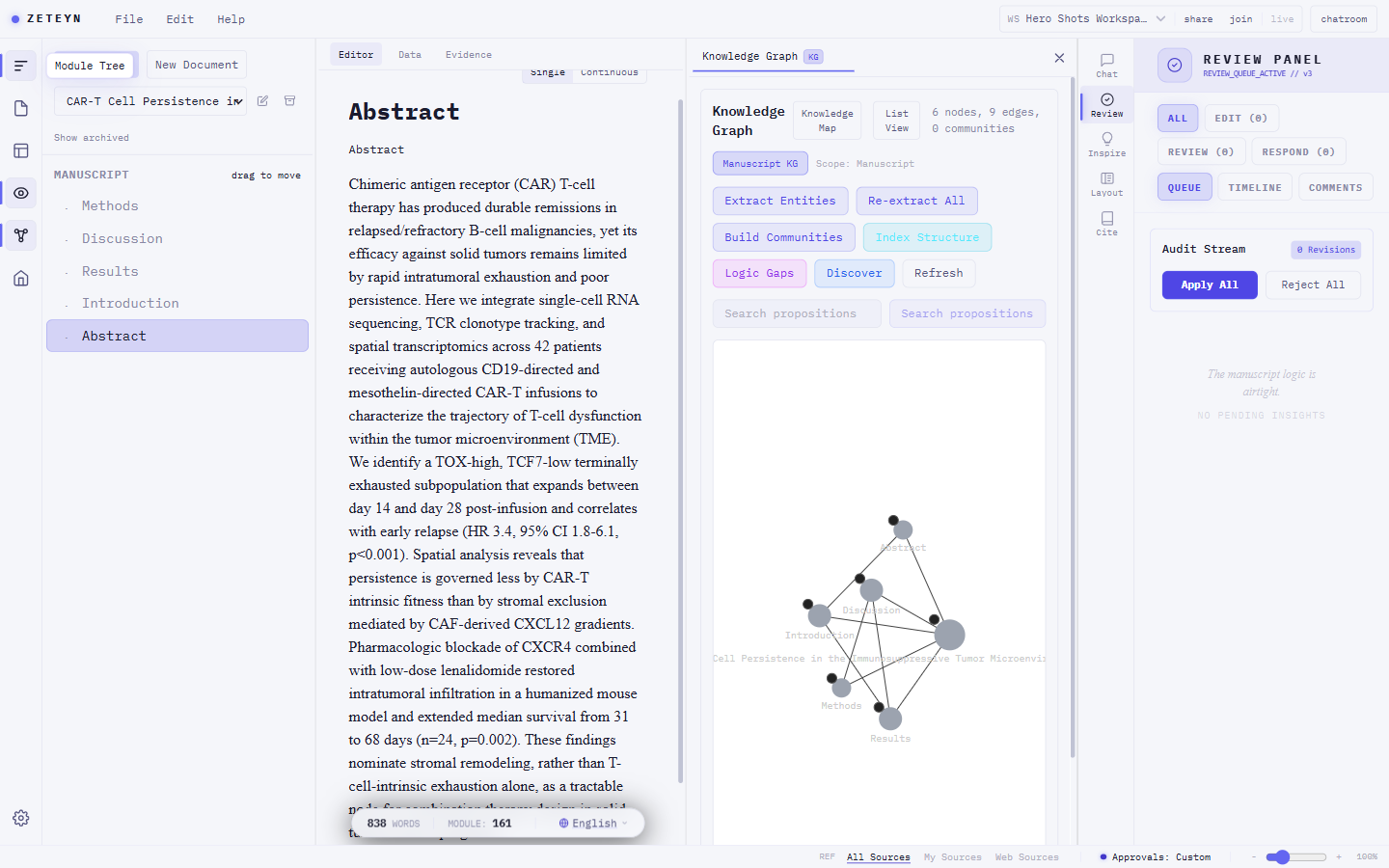
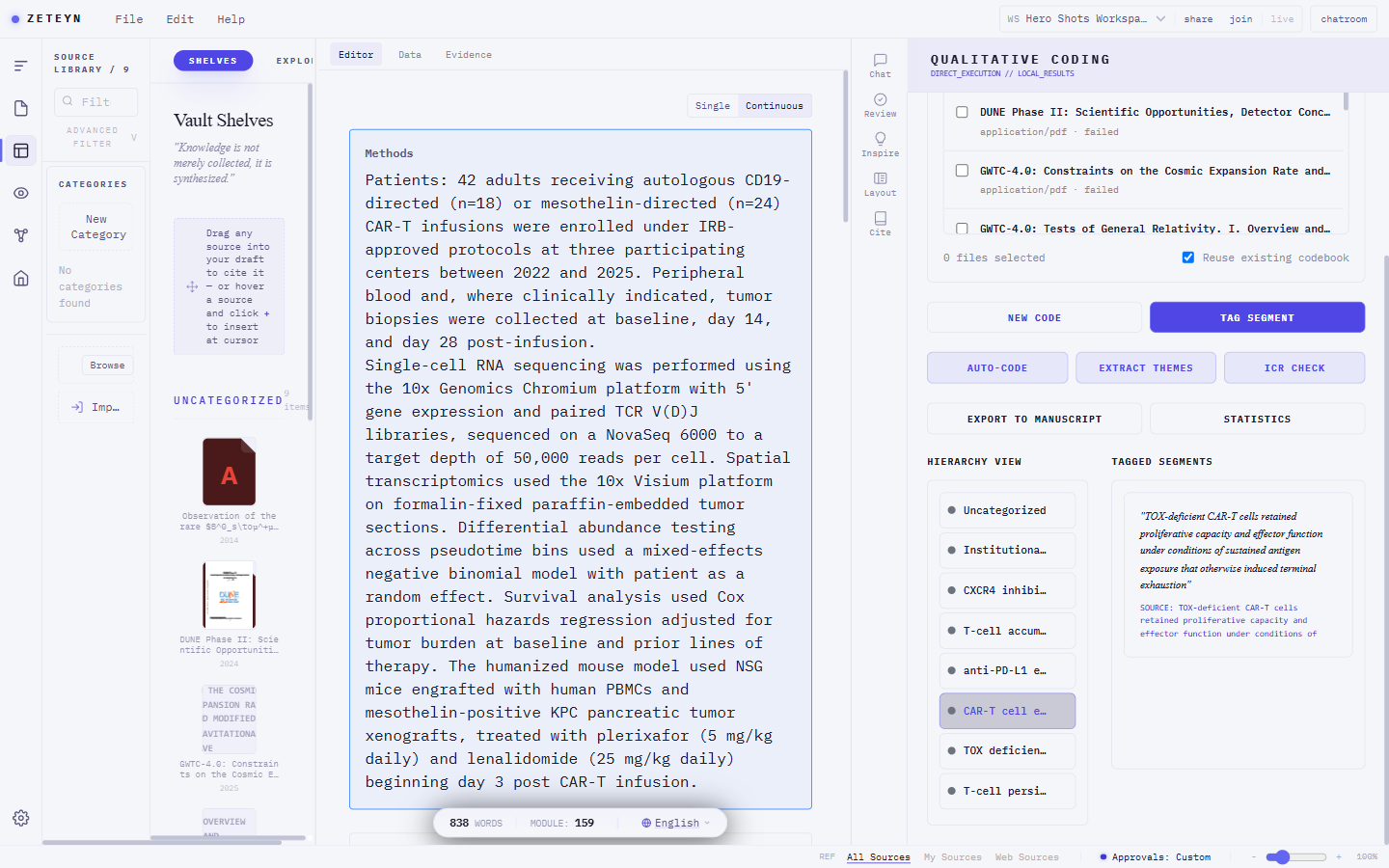
One workbench for many fields: view 2D and 3D molecular structures pulled live from PubChem and PDB, run FFT and spectrogram analysis on your data, geocode and map places, view DICOM medical images, extract a knowledge graph from your sources, and code qualitative interviews with inter-coder reliability, all inside your manuscript, with skills spanning data science, chemistry, medicine, law, and the social sciences. Results stay publication-quality in the final export.
One click to submission format
"I wrote the science, then lost a day to the template and the citation style."
Export a formatted, submission-ready manuscript in one click, citations rendered and structure mapped. Switch journal templates without reformatting. Export to PDF, Word, LaTeX, Beamer slides, PowerPoint, and posters.
Productive in fifteen minutes
"New tools drop me into an empty screen and expect me to figure it out."
A seven-step tour walks you through the document, chat, vault, citing, and export the first time you open Zeteyn. Skip it any time, restart it from the Help menu. No IDE experience needed.
A free desktop app, if you want it fully offline
"Sometimes I need it running with zero network access."
The desktop app runs on your own machine with your own key, free forever, no cloud step required.
Teach it your lab, journal, and method
"Every generic agent forgets my field's conventions and my supervisor's style."
Turn any chat into a reusable skill that captures your journal format, lab protocol, or review style. Keep it private, or publish it to the skill marketplace and earn credits when other researchers use it. The marketplace ships with 25 curated research and writing skills, literature review, peer review, scientific writing, citation management, hypothesis generation, and more, each with a description, example prompts, and a works-well-with list so you can chain them into a workflow. A built-in browser, web clipper, PDF annotator, and Zotero import keep every source one step away.
Every PDF opens in the order it was actually written
"I pasted a two-column PDF into a chatbot and it stitched sentences from unrelated columns together."
Zeteyn extracts every PDF with correct multi-column reading order and lays it out as a structured, segmented reader: headings, paragraphs, and tables with a section navigator. Run Highlight key points and Zeteyn marks the important sentences directly in the text, extractive only, so every highlight is a sentence pulled straight from the source, never invented. Open Explain on any section for a plain-language walkthrough streamed as you read, and select any passage to send it straight to chat.
It knows your research
"Every new conversation, I re-explain the same papers and the same objection I already answered."
Your sources and confirmed claims stay with the project. Ask it to challenge you and it cites the counter-example you saved three months ago. Open your workspace and it briefs you on what grew and what to read next.
Every claim carries receipts
"My advisor asked how much of this the AI actually wrote, and I had no record to show her."
A conclusion stays locked until verified sources back it. Citations carry three visible trust levels. One click exports who wrote what, with which sources, for your advisor or your journal.
Figures live in your manuscript
"I regenerate the same plot in R every time one data point changes, then re-paste it into Word."
Forest plots render inside the manuscript at journal quality. Adjusting a title or an axis takes two clicks. Change the data and every figure using it flags itself for a refresh.
An agent that works inside your editor.
| Office AI add-ins | Chat assistants | Code agents | Zeteyn | |
|---|---|---|---|---|
| Integration | Sidebar suggestions, you paste | Chat box, copy-paste | Agent edits code | Agent works inside your manuscript |
| Knows research | No | No | No (code only) | Skills across many disciplines and journal formats |
| Workflow | Single completion | Single chat | Code autocomplete | Autopilot: revise, review, rebut |
| Your AI cost | Extra add-on sub | Per-message | API burn | Your own AI: API key, hosted, or your machine |
| Control | None | Black box | Black box | Glass box: see, audit, roll back |
From first idea to final submission.
Every mode has a purpose. Together they cover the full arc of academic writing.
You have raw notes, half-formed hypotheses, and a pile of PDFs. The AI asks questions, surfaces connections, and suggests which ideas are worth pursuing. When something is worth keeping, save it to your Thought Log or Evidence Vault with one click.
The AI reads your current draft before every suggestion. It never works from memory or a stale version. Every proposed change appears as a diff you must approve. You can accept, reject, or adjust each one. Nothing changes without your confirmation.
Drop reviewer or supervisor feedback in any form (PDF, screenshot, pasted email). Zeteyn extracts each comment, maps it to the right section of your manuscript, suggests a specific revision, and drafts your Response Letter as you work through the list item by item. Clear each to green when resolved.
Switch to Challenge and ask Zeteyn to read your work as a hostile peer reviewer. It audits every numerical claim, cross-checks your citations against what the cited papers actually say, constructs counterarguments, and rates each issue Fatal, Major, or Minor. You decide what gets fixed and what gets defended.
Load an external paper and produce a structured peer review report. Zeteyn analyzes the manuscript, identifies strengths and weaknesses, rates severity of issues, and generates a recommendation (Accept, Minor Revision, Major Revision, Reject). Ready to export as PDF for journal submission.
Choose your plan.
Start free, no card required. The free tier is the full app: bring your own AI key or run a local model, and you never pay us for the AI.
Everything you need to start. No credit card required.
- Onboarding and skill credits you can earn
- 2 GB Evidence Vault
- All five AI modes
- Thought Log & Checkpoint rollback
- Chatbox: bring your own key or local Codex runner
- Read-only collaboration
- Unlimited documents. Storage is the only limit.
The starter pack. Full AI chatbox and real-time collaboration, with room to grow.
- 2,000 monthly AI credits
- 10 GB cloud Vault
- Full chatbox, incl. hosted AI
- Real-time collaboration (edit)
- Unlimited documents
- All five AI modes
- Codex sandbox: metered from your included credits, with platform model credentials
For researchers running long-form projects who need the cloud sandbox and full environment.
- 5,000 monthly AI credits
- 50 GB cloud-sync Vault
- Ready-to-go hosted sandbox with platform model credentials, metered from included credits
- Cloud sync across devices
- Unlimited documents
Invite your group. Hosted AI stays in this workspace. Students can stay on Free.
Editors keep the same edit access they already have in this workspace.
Lab packs use the same credit packs: $5 / 1,000, $10 / 2,200, $20 / 5,000.
Top-ups on any plan: credit packs ($5 / 1,000, $10 / 2,200, $20 / 5,000) and a storage pack ($5 for +50 GB). A Lab pack lands in the workspace wallet.
Four ways to run AI
Route AI to your own always-on machine, running the Codex subscription you already pay for. Your Codex plan, not Zeteyn credits.
Run an open model (Ollama, LM Studio, vLLM) on your own machine. Your data never leaves your device, fully offline, no key, no credits.
Bring OpenAI, Anthropic, Google, DeepSeek, OpenRouter, Groq, Together, Fireworks, DeepInfra, Mistral, xAI, Cerebras, Cohere, Hugging Face, Baseten, or a local compatible endpoint. You pay the provider directly.
Zeteyn runs the hosted path with platform model credentials. 2,000 credits/month on Plus, 5,000 on Pro. No user key required.
Git mode: your manuscript stays in a local git repository, off our servers. Available on all plans.
What is included
Almost everything is free. You pay only for resources we host.
| Free | Plus | Pro | |
|---|---|---|---|
| Resources | |||
| Documents | Unlimited | Unlimited | Unlimited |
| Hosted AI credits / month | Earn at onboarding | 2,000 | 5,000 |
| Workspace-locked hosted credits | None | Owner can fund a lab wallet | Owner can fund a lab wallet |
| Storage | 2 GB | 10 GB | 50 GB |
| Cloud sync (multi-device) | ✓ | ✓ | ✓ |
| Hosted sandbox access | - | ✓ | ✓ |
| Chatbox & collaboration | |||
| AI chatbox | BYOK or local Codex runner | Full + hosted AI | Full + hosted AI |
| Real-time collaboration | Read-only | Editable | Editable |
| Tools (always free) | |||
| Export (PDF, DOCX, HTML) | ✓ | ✓ | ✓ |
| Full-text search | ✓ | ✓ | ✓ |
| Citations and Zotero | ✓ | ✓ | ✓ |
| Evidence panels (all) | ✓ | ✓ | ✓ |
| Thought Log and rollback | ✓ | ✓ | ✓ |
| Manuscript editor | ✓ | ✓ | ✓ |
| Git mode: own your data | ✓ | ✓ | ✓ |
| BYOK and home-runner AI (your own key or compute) | ✓ | ✓ | ✓ |
| Web and desktop | ✓ | ✓ | ✓ |
First launch on desktop takes one extra click
Your system asks you to confirm the first launch while these early builds finish code-signing. Windows: click More info, then Run anyway. macOS: right-click the app, then choose Open. Linux: run chmod +x on the AppImage, then open it.
Microsoft Defender SmartScreen may show Windows protected your PC while early builds finish code-signing. It is a publisher check, and these steps clear it.
- In the browser download menu, click Keep.
- If the blue SmartScreen window opens, click More info.
- Click Run anyway, then continue the installer.
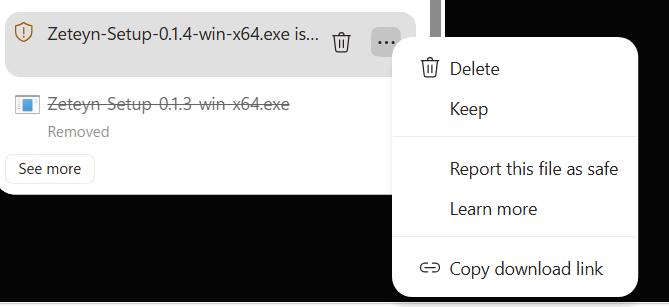
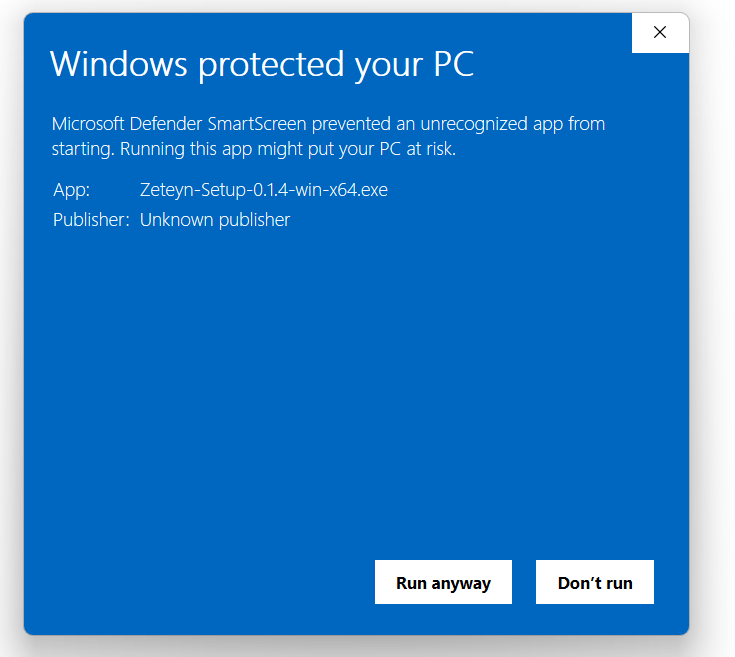
The macOS build targets Apple Silicon (M1 and later). Gatekeeper asks you to confirm the first launch, and a right-click open approves it once.
- Open Zeteyn-0.1.6-arm64.dmg and drag Zeteyn to Applications.
- In Applications, right-click Zeteyn and choose Open.
- In the dialog, click Open to confirm.
- On newer macOS, if the app stays closed, go to System Settings, then Privacy & Security, and click Open Anyway.
The AppImage runs on most distributions once the file is marked executable.
- Make the file executable:
chmod +x Zeteyn-0.1.6.AppImage - Run it:
./Zeteyn-0.1.6.AppImage - On a minimal system, install FUSE first so the AppImage can mount.
Why download instead of using the web app? The desktop version runs a local AI model entirely on your own hardware. Your files never touch a server. Useful if you work in a high-security environment, need to draft offline, or want AI suggestions without network latency.
Four zones, one interface.
Zeteyn packs a lot on screen. It stays simple once you know what each column is for. Open a source and the right tool appears, with no modes to pick.
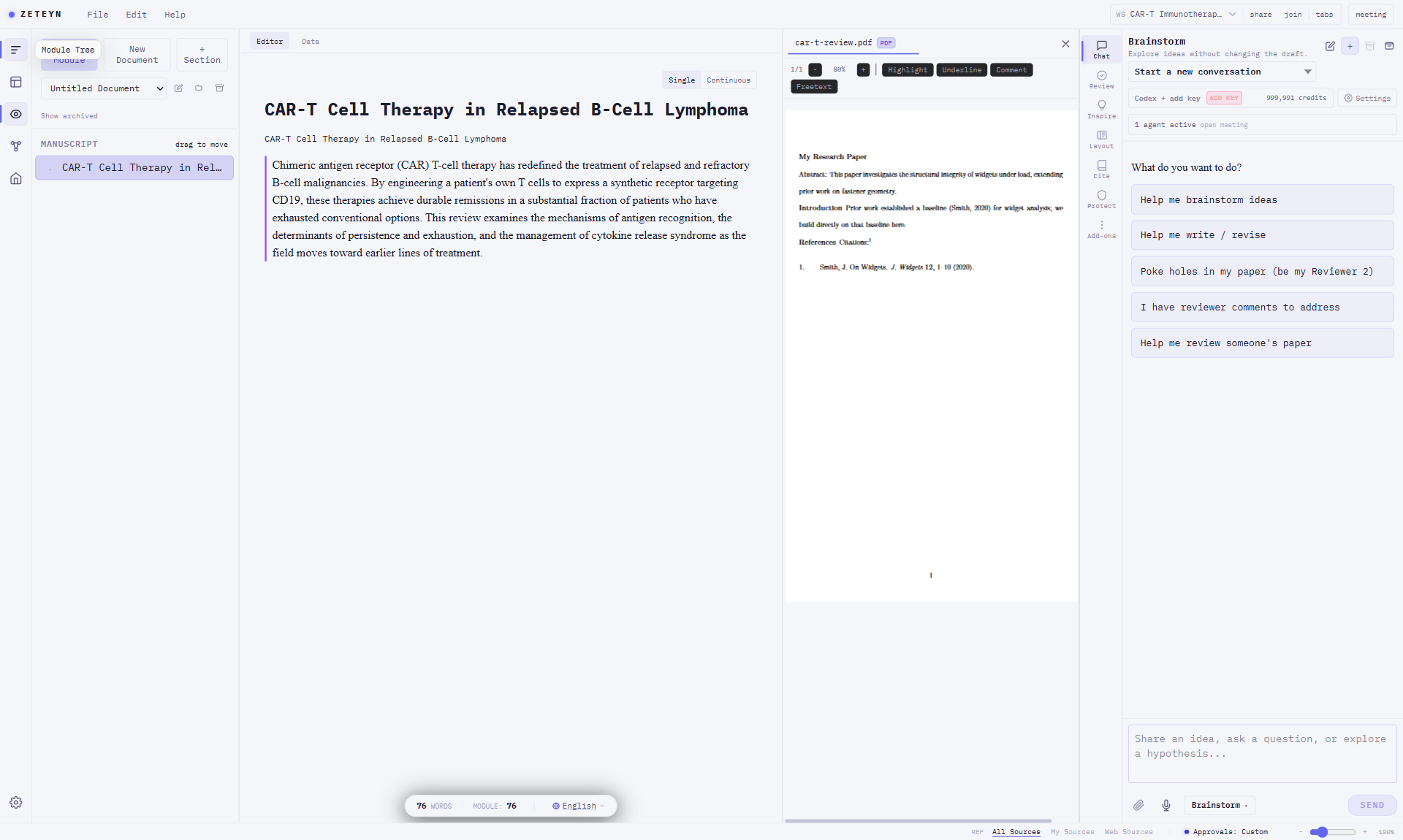
Vault & structure
The Evidence Vault holds every source (data files, evidence, documents) in one tree. The Module Tree is your manuscript's outline, with inserted data artifacts as leaves.
Editor & Data
Write your manuscript in the Editor. Open a data source in Data to actually process it (run code, analyse, plot), then update the file or turn the result into an artifact.
Read-only reference
Documents and evidence (PDF, DOCX, images) open here to read, not edit. Data artifacts you produce also preview here, updating live as you process.
The assist rail
Chat with the agent, Review your draft (gaps, citations, lint), find Inspiration, set Layout, manage Citations, and reach discipline tools under Extensions.
The core loop: click a data source on the left → process it in the center → see the artifact in the viewer → insert it into your manuscript. When the data changes, the artifact re-syncs everywhere.
Frequently asked questions.
Is Zeteyn just another ChatGPT wrapper for academics?
Will the AI change my writing without asking?
How does Zeteyn prevent hallucinated citations?
Can I import my existing Zotero or Mendeley library?
My institution has strict data policies. Is my research data safe?
Web version: Files are stored in your private Vault, encrypted in transit and at rest. We do not use your content to train AI models. You can review our full data processing terms in the Data Processing Addendum linked in the footer.
I have never used a tool like this. How long does it take to learn?
Can I use Codex I already have on my computer?
What happens to my work if I stop paying?
Who owns the copyright of work I write in Zeteyn?
How is this different from Overleaf, Notion, or Obsidian?
Notion is a notes and project management tool. It does not understand academic argument structure, citation linking, or manuscript submission requirements.
Obsidian is a personal knowledge base. Powerful for notes, not designed for producing a publication-ready manuscript with source-grounded claims.
Zeteyn is designed specifically for the process of writing a research paper: from first reading to final submission, with five AI modes that cover brainstorming, editing, responding to reviewers, stress-testing your own arguments, and producing formal peer review reports.
How is Zeteyn different from Claude Science?
But automation has a boundary: what you can automate is what you can compute. The moment the work turns to theory, to argument, to the places where you have to think through why one step earns the next, autopilot is the wrong tool, not because a model cannot write it, but because this is work you have to keep your hands on. That holds for the humanities as much as for the theory half of any science.
Zeteyn takes the other road: you stay in the loop. Every edit the AI makes to your manuscript is a proposal you accept or reject. Your argument is built from modules you can expand as deep as you want and collapse back. Any step you dislike rolls back in one click, like Ctrl+Z with a longer memory than yours. Citations can only come from your own vault, so it cannot invent a sentence that merely sounds right.
It does not think for you. It lays your thinking out, keeps it in order, and lets you take any of it back.
And the conveniences are there: it runs in your browser on any OS and installs as a desktop app on Windows, and the model is yours (Claude, Codex, DeepSeek, or a local one), including bringing a second model in to review the first, instead of the same model grading its own homework.
Can I collaborate with my supervisor or co-authors?
Does it support math, chemistry, and scientific diagrams?
/tikz for diagrams and /code for a code cell;
molecular structures (2D and 3D), maps, DICOM images, and other discipline tools open from the panel rail.
Equations render inline with standard LaTeX syntax, and figures are rendered so they look the same in your
exported PDF as in the editor.I switched AI tools before and lost everything. What makes this different?
Get in touch.
Feature requests, questions, or feedback from researchers actively using Zeteyn carry the most weight. We read everything.